PocketHotel
For independent hotels & guesthouses

Your front desk, housekeeping, kitchen and accounts. One app.

Check guests in by photographing their ID. Send housekeepers their rooms on their phones. Let guests order room service from a QR code. Watch the day’s takings add themselves up — on the computer and phones you already have.

On Windows, Android, iPhone, Mac, Linux and any browser. 7-day free trial, no card needed to start.

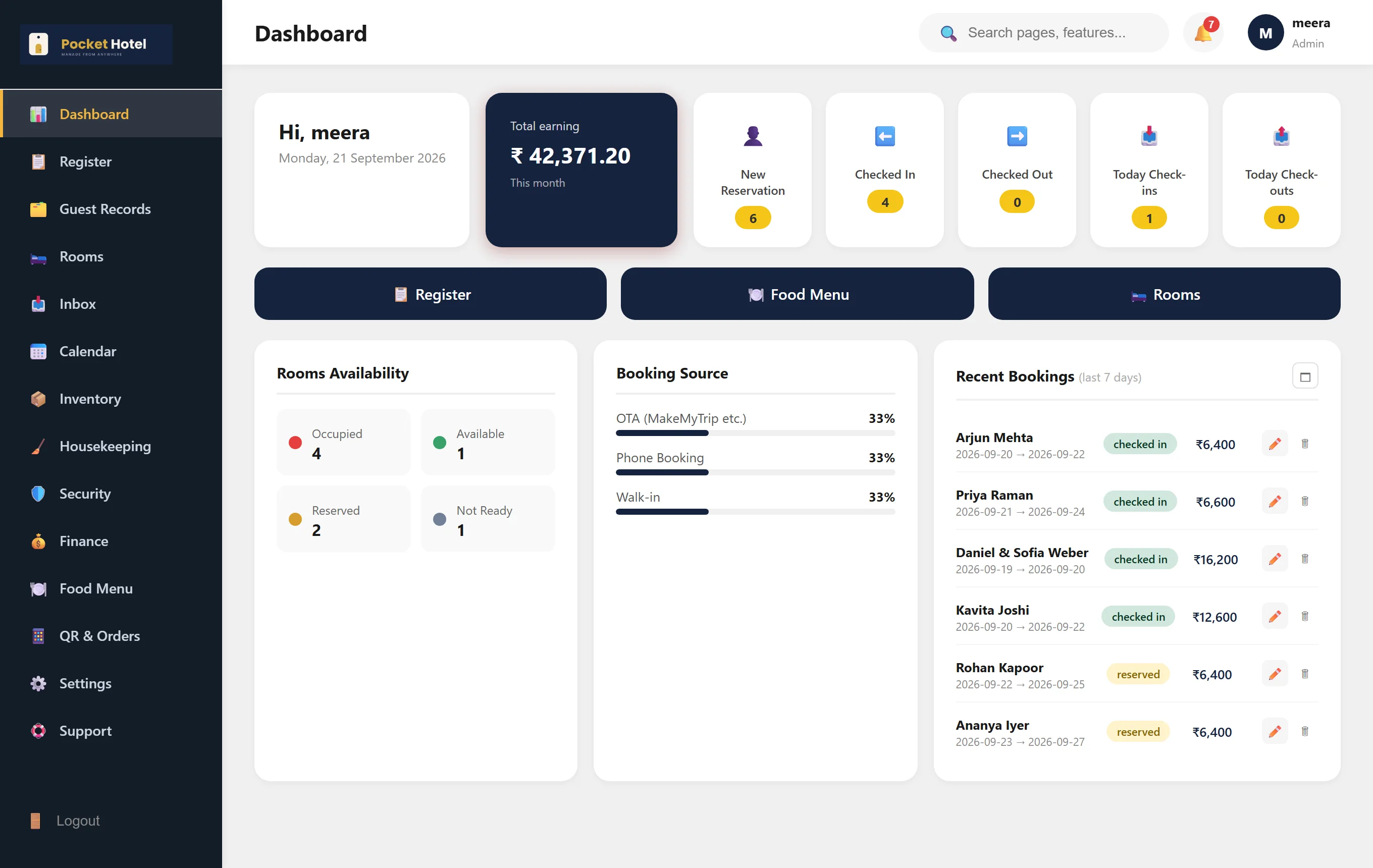
Pocket Hotel dashboard for a demo hotel: 4 guests checked in, 42,371 rupees earned this month, room availability and recent bookings.
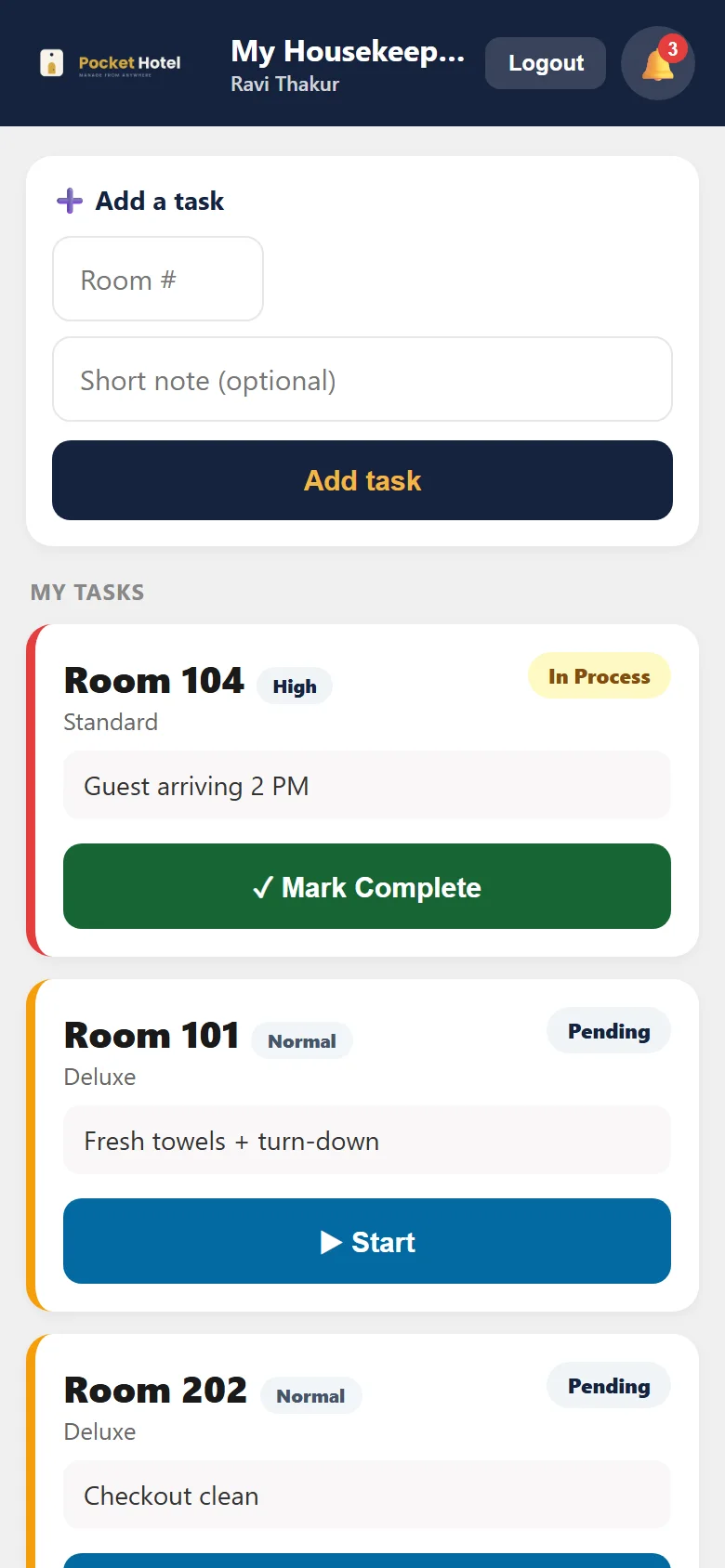
A housekeeper's phone showing their room list: Room 104 in process, Rooms 101 and 202 pending.

Real screens, from a demo hotel.

How it runs your day

The jobs that eat a small hotel’s time, handled where they happen.

No paper register to copy from, no calling the kitchen, no end-of-day sums in a notebook.

Check-in

Photograph the guest’s ID. The form fills itself.

Take a photo of an Aadhaar card, driving licence, passport, voter ID or PAN — front and back if the address is on the back — and the guest’s name, ID number, full address and date of birth are filled in for you.

  • Anything it can’t read clearly is left blank or marked for you to check. It never guesses.
  • Reads labels in Hindi as well as English, and keeps the whole address, not just the first line.
  • Travelling together? Scan every co-guest in the room the same way.
Money

The day’s accounts write themselves.

Every check-in, every room-service order and every item taken from stock is posted to your books automatically. Room-service is added to that room’s bill, so the guest settles it all at checkout.

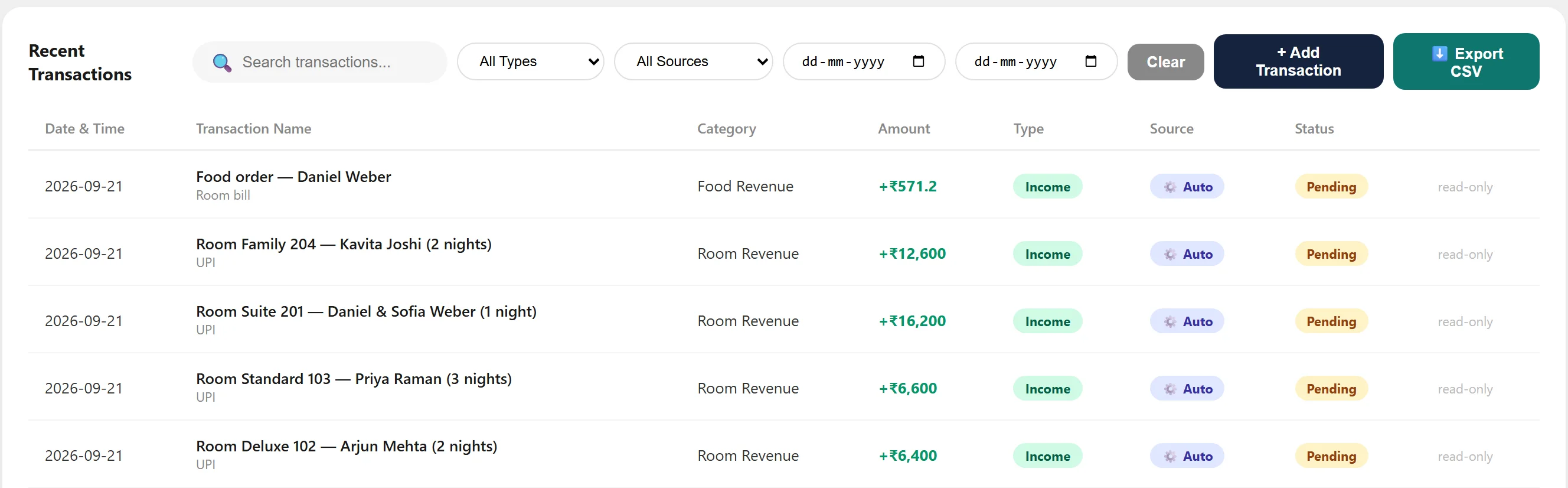
  • Automatic entries are marked Auto, can’t be edited by hand, and stay Pending until the bill is paid.
  • Undo a check-in and redo it, and it’s still counted once. No double billing.
  • GST bills with CGST, SGST and your GSTIN, in three layouts or on your own letterhead. Export to CSV for your accountant.
Recent transactions: four room stays and one room-service order, each marked Income, Auto, Pending and read-only.
Four check-ins and a room-service order. Nobody typed any of these.
Housekeeping

Housekeepers get their rooms on their phone.

The front desk adds a job; it appears on the housekeeping team’s phones with the note and priority. They tap Start, then Mark Complete — and the room flips back to Available on your board.

  • A job one housekeeper has started can’t be taken over by another.
  • Housekeepers only see housekeeping. No bookings, no money, no guest IDs.
  • You see who is on which room, without walking the corridors.
Housekeeping on a phone: Room 104, high priority, in process with a Mark Complete button; Rooms 101 and 202 pending with Start buttons.
Room service

Guests order from a QR code in the room.

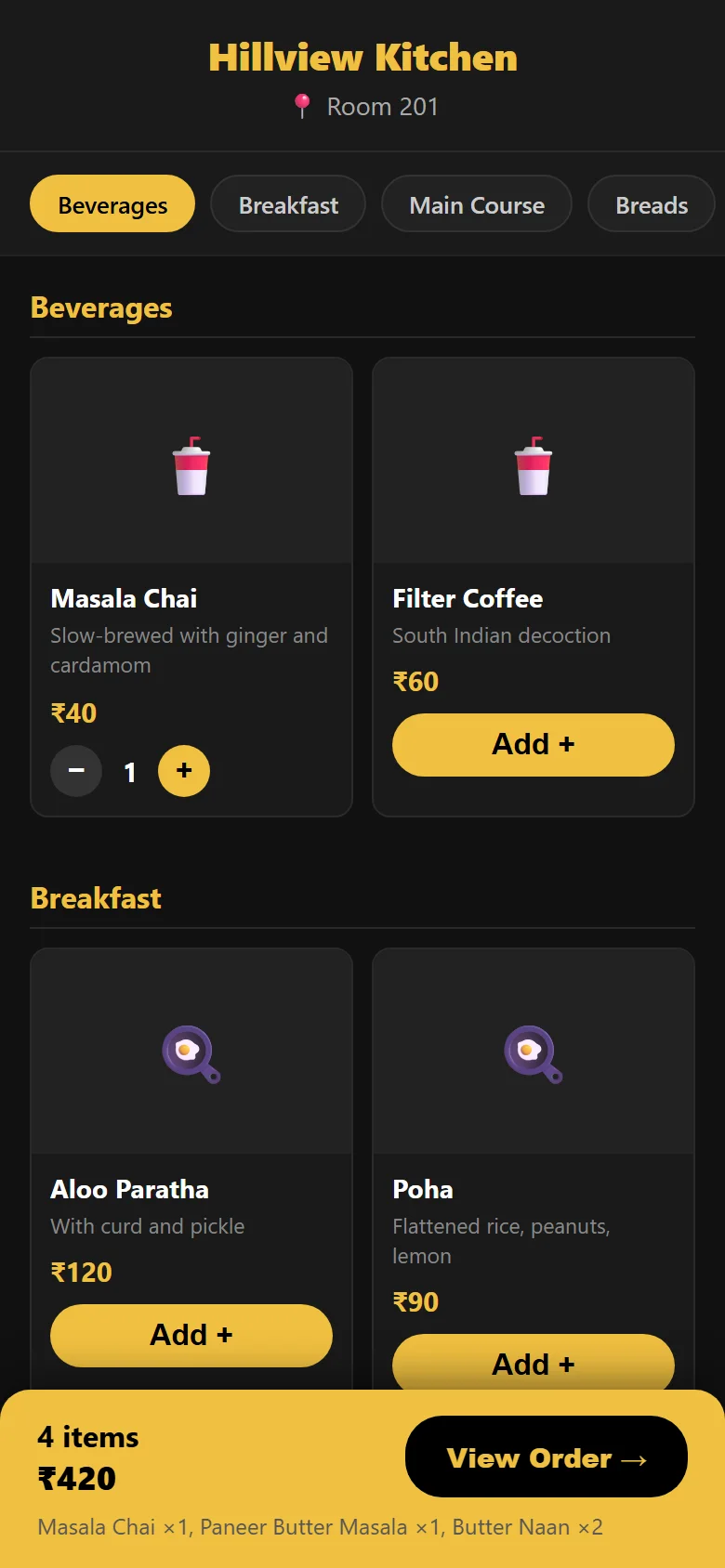
Print a QR code for each room or table. Guests scan it with their own phone camera — no app, works on mobile data — and order from your menu. The kitchen hears a chime and a spoken “New order arrived” within seconds.

  • Guests pay at checkout, or straight away by UPI QR or PayPal.
  • Set restaurant and kitchen hours. Outside them, guests see your closed message and orders are refused.
  • Already have a printed menu? Photograph it and the dishes and prices are pulled out for you to review.
A guest's phone showing the Hillview Kitchen menu for Room 201, with four items in the order and a View Order button.
Also included

Built around how a small hotel is actually staffed.

Everyone sees only their job

Front desk, housekeeping, kitchen, accountant and security each get their own screens. Your accountant sees the books and nothing else.

Guest IDs kept private

ID photos are never public. Every time someone opens one, it’s logged: who, whose ID, which side. They’re deleted automatically after checkout on the schedule you set; the stay record stays.

Email guests from your own address

Connect your hotel’s Gmail and messages to guests go out from you, not from us. Staff announcements go to everyone at once.

More than one property

Run several hotels from one login and switch between them. Each hotel’s bookings, staff and money are kept completely separate.

Stock that tells you when it’s low

Track towels, toiletries and kitchen supplies with a reorder level on each, and get a heads-up before you run out.

Your data, backed up by you

Download your hotel’s bookings, records and ID photos as one backup file whenever you like, and restore it from inside the app.

Pricing

One price for everything. You only pay more for more hotels.

Every plan includes every feature on this page and every member of staff you add. Try it free for 7 days first.

Free trial

See if it fits how your hotel runs.

Freefor 7 days

No card needed to start.

  • Everything included
  • 1 hotel
  • Afterwards, 7 more days to look at your data read-only before you decide
Start free trial

Monthly

Pay for 30 days at a time.

₹599$25/ month


  • Everything included
  • Up to 5 hotels
Start free, then go monthly
Best value

Yearly

One payment covers 365 days.

₹1,999$110/ year

Save 72% against paying monthly (₹7,188 a year)Save 63% against paying monthly ($300 a year)

  • Everything included
  • Up to 30 hotels
Start free, then go yearly

Nothing renews on its own: you pay when you choose to, and are never charged automatically. Running more hotels than that? Add 10 more at a time, from ₹499$6. Prices in rupees for India, Nepal and Bhutan, paid through Cashfree. Prices in US dollars, paid through PayPal.

Get the app

Use it on whatever is at your front desk.

Same account everywhere. Start in the browser today and install it later, or install now — nothing to migrate either way.

Open Pocket Hotel in your browser

It runs in any modern browser. On most devices you can also install it as an app — see below.

Open Pocket Hotel
Windows Your device

Desktop app for Windows 10 and 11.

Download for Windows →
Android Your device

App for Android phones and tablets.

Download the Android app →
iPhone & iPad Your device

Add it to your Home Screen from Safari. It opens full-screen, like any app.

How to add it →
Mac Your device

Install it from Safari, Chrome or Edge. It gets its own window and a place in your Dock.

How to install it →
Linux Your device

AppImage for most desktop distributions.

Download for Linux →
Any browser Your device

Nothing to install. Log in from any computer, tablet or phone.

Use it on the web →
Install it as an app on another device

iPhone or iPad (Safari)

  1. Open Pocket Hotel in Safari.
  2. Tap the Share button.
  3. Tap Add to Home Screen, then Add.

Mac (Safari)

  1. Open Pocket Hotel in Safari.
  2. In the menu bar, choose File → Add to Dock (macOS Sonoma or later).

Chrome on Mac, Windows or Linux

  1. Open Pocket Hotel in Chrome.
  2. Click the install icon at the right end of the address bar, then Install.
  3. No icon? Use ⋮ → Cast, save and share → Install page as app.

Edge on Mac or Windows

  1. Open Pocket Hotel in Edge.
  2. Click App available in the address bar, then Install.
  3. Or use ··· → Apps → Install this site as an app.

Android (Chrome)

  1. Open Pocket Hotel in Chrome.
  2. Tap , then Add to Home screen or Install app.

Firefox

  1. Firefox can’t install web apps on a computer. Use Pocket Hotel in a normal Firefox tab, or open it in Safari, Chrome or Edge to install it.

Downloads always fetch the latest version. The Windows app isn’t code-signed yet, so Windows may show “Windows protected your PC”: choose More info → Run anyway. On Android, allow your browser to install apps when asked. All downloads